Google Hacking
最近更新:2025-10-20   |   字数总计:846   |   阅读估时:3分钟   |   阅读量:
  1. Google Hacking
    1. 基本语法
    2. 高级搜索
  2. 实例
    1. 实例1:site、filetype、intext 配合
    2. 实例2:google搜索自己的blog是否被收录
  3. 网络攻防技术课程实验–>域名信息收集工具
    1. 实验要求
    2. python代码的实现

Google Hacking

Google Hacking就是利用搜索引擎强大的搜索功能,选用搜索语法和特殊的搜索关键字,将隐藏在目标网站中的不恰当配置信息和后门信息找出来。

基本语法

  • and :逻辑与
  • or :;逻辑或
  • +:强制包含搜索项
  • -:逻辑非
  • “关键词”:完整匹配
  • *?:通配符

高级搜索

  • site:搜索具体服务器或域名的网页
  • filetype:搜索特定类型的文件
  • intitle:搜索网页标题
  • inurl:搜索URL
  • intext:搜索正文
  • link:搜索连接到指定网页的网页
  • allintitle:用法和intitle类似,但可以指定多个词

这些方法可以互相可以组合。

附:Filetype所支持的文件类型

• Adobe Portable Document Format (pdf)

• Adobe PostScript (ps)

• Lotus 1-2-3 (wk1, wk2, wk3, wk4, wk5, wki, wks, wku)

• Lotus WordPro (lwp)

• MacWrite (mw)

• Microsoft Excel (xls)

• Microsoft PowerPoint (ppt)

• Microsoft Word (doc)

• Microsoft Works (wks, wps, wdb)

• Microsoft Write (wri)

• Rich Text Format (rtf)

• Text (ans, txt)

实例

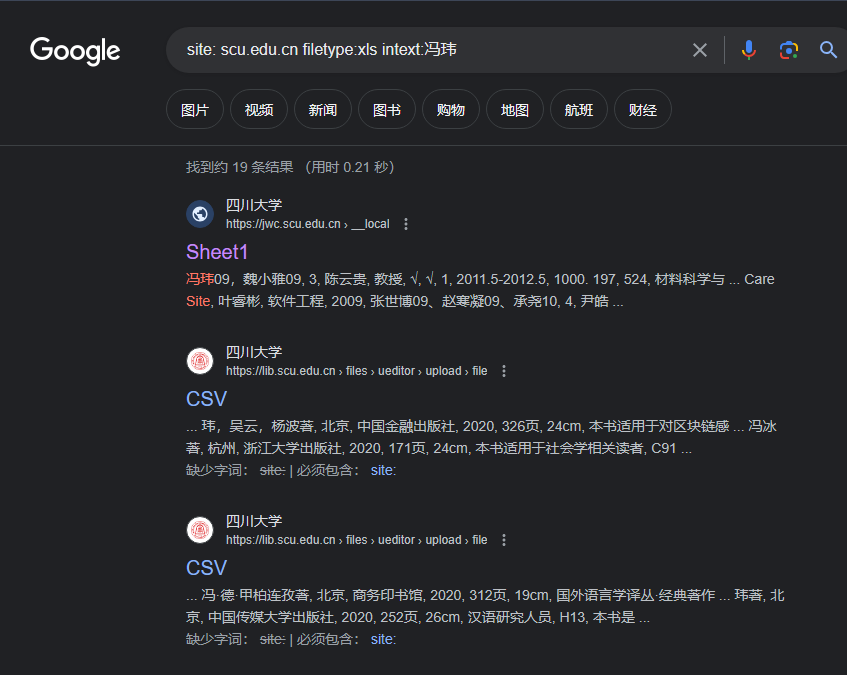
实例1:site、filetype、intext 配合

1
site: scu.edu.cn filetype:xls intext:冯玮

1

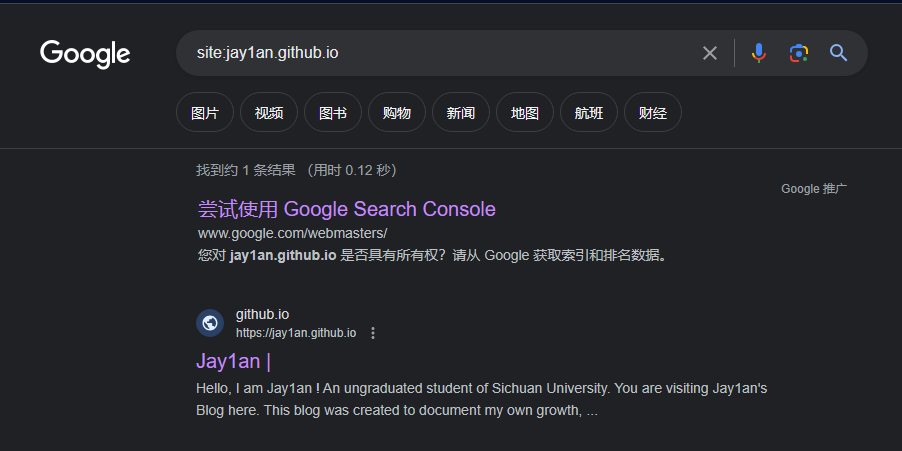
实例2:google搜索自己的blog是否被收录

2

网络攻防技术课程实验–>域名信息收集工具

实验要求

  • 支持百度搜索引擎的域名提取,其中从百度搜索引擎提取的域名需为真实域名,而非百度的域名跳转链接。
  • 可扩充其他功能,比如域名所在的标题等信息。

python代码的实现

1
2
3
4
5
6
7
8
9
10
11
12
13
14
15
16
17
18
19
20
21
22
23
24
25
26
27
28
29
30
31
32
33
34
35
36
37
import requests                         
from bs4 import BeautifulSoup
from urllib.parse import urlparse
import time
import random

# made by jay1an 2023/9/12
def baidu_search(pages):
Subdomains = []
Subdomains_dict = {} # 字典存储网域和标题
# site:[域名] eg. site:qq.com
hearders = { # 在这种情况下 仅加User-Agent即可正常获得数据
'user-agent':'Mozilla/5.0 (Windows NT 10.0; Win64; x64) AppleWebKit/537.36 (KHTML, like Gecko) Chrome/90.0.4430.93 Safari/537.36 Edg/90.0.818.56',
}
for start in range(pages):
url=f'https://www.baidu.com/s?wd=site%3Adouban.com&pn={start*10}' # 改变参数实现翻页 # 该url为示例,爬取的是douban.com域名下的子域名
resp = requests.get(url,headers=hearders)
time.sleep(random.uniform(0.5,1.5)) # 加入随机延迟 模拟真实点击 (important)
soup = BeautifulSoup(resp.content,'html.parser') # 使用BeautifulSoup对网页结果进行解析
class_name = "result c-container xpath-log new-pmd"
div_elements = soup.find_all('div', class_=class_name) # 找出class的值为result c-container xpath-log new-pmd的div块
for i in div_elements: # 从div块中提取出url和title
link = i.get('mu')
domain = str(urlparse(link).scheme + "://" + urlparse(link).netloc)
if domain in Subdomains: # 去重
pass
else:
Subdomains.append(domain)
Subdomains_dict[domain] = i.h3.a.get_text()
return Subdomains_dict # 返回值为字典,'domain' : 'title'


# bing_search()

dict = baidu_search(10) # 爬取10页的结果
for key, value in dict.items(): # 输出爬取的结果
print(f'{key}: {value}') # eg. "https://www.qq.com: 腾讯网"

运行结果:

1
2
3
4
5
6
7
8
9
10
11
12
13
14
15
16
17
18
19
20
https://help.douban.com: 帮助中心
https://www.douban.com: 豆瓣电影
https://movie.douban.com: 豆瓣电影
http://group.douban.com: 讨论精选 (豆瓣)
https://book.douban.com: 豆瓣读书
http://mobilestore.douban.com: 登录豆瓣
https://m.douban.com: 豆瓣电影
https://frodo.douban.com: 豆瓣App
https://jobs.douban.com: 在豆瓣工作
https://beijing.douban.com: 豆瓣同城_北京
https://blog.douban.com: 豆瓣blog
https://market.douban.com: 豆瓣豆品
https://music.douban.com: 豆瓣音乐
https://read.douban.com: 电子图书 | 豆瓣阅读
https://dongxi.douban.com: 豆瓣
http://talion.douban.com: 豆瓣(手机版)
http://douban.com: 豆瓣
http://shuo.douban.com: 豆瓣
https://site.douban.com: 豆瓣
https://accounts.douban.com: 登录豆瓣